Page 1 of 2
Migrate settings to new laptop

Posted:
Sun Jan 10, 2021 3:14 pmby Cardinal51
Hi all,
My laptop broke, so got a new one.
Before: Lenovo laptop S530 - Intel Core i7-8565U @ 1.80GHz - 16 GB RAM - Onboard Intel UHD Graphics 620 - Win10 64 - 13" Screen @ 1280 x 720 - 1TB SSD - TS2021 graphics @ MEDIUM , shadows a notch higher - having a great time running tough American diesels!
Since today: HP Laptop Pavilion x360 14 - Intel Core i7-1165G7 @ 2.80GHz - 16 GB RAM - Onboard Intel Iris Xe Graphics - Win10 64 - 14" Screen @ did not decided on resolution and TS settings yet.
Still a weak system for TS of course. But I had great Train Simulator fun on my old laptop and with this faster processor and way better graphics I am sure things have improved. As a matter of fact during a Quick Drive test run on Sherman Hill I got frame rates three time of what I had before !
I did a fresh Steam install on my new laptop and still have the old laptop with the previous Steam and Train Simulator install.
What files do I need to copy to get my Results / Score / Accomplishments back on the new laptop ?
Is there also a file to copy to get same settings for Graphics / Audio / Et cetera back ?
Thanks
Re: Migrate settings to new laptop
Posted:
Sun Jan 10, 2021 3:55 pmby trev123
Ok, there are quite a few ways to transfer files/programs from one computer to another. Read here from MS
https://www.microsoft.com/en-us/windows ... -your-data I would personally go about doing this by taking the old drive out of the old computer and use and connect the drive up to the new computer by USB using an external case which you put your old drive into.
Re: Migrate settings to new laptop
Posted:
Mon Jan 11, 2021 5:21 amby Cardinal51
Hi Trev,
Thanks a lot for the help and sorry I was not more clear.
I mean the Train Simulator "Results / Score / Accomplishments" settings and the "Graphics / Audio / Et cetera" settings. I assume copying a few files will do the trick, but which ones.
Re: Migrate settings to new laptop
Posted:
Mon Jan 11, 2021 10:33 amby AlcoFan
I believe all of the scores and achievements are linked to your Steam account.
Re: Migrate settings to new laptop
Posted:
Mon Jan 11, 2021 10:54 amby Cardinal51
Thanks Alco
Unfortunately Scores and Achievements did not show up yet :-(
Re: Migrate settings to new laptop
Posted:
Mon Jan 11, 2021 12:22 pmby buzz456
Josh is correct. I have copies of TS2021 on three different computers and the information shows up on all three.
Re: Migrate settings to new laptop
Posted:
Mon Jan 11, 2021 1:12 pmby Cardinal51
Thanks Buzz.
But I am correct also :-) No completed career scenarios, tick marks, et cetera :-(
Any ide what could be wrong ?
Just fired up the old laptop again . . . and it is still all there.
Re: Migrate settings to new laptop
Posted:
Mon Jan 11, 2021 2:47 pmby buzz456
All I can say is that often you need to sign off from Steam wait a bit and then sign back in to your Steam account for it to make changes. Someone more attune to the to the finer points might be able to tell you what to delete on your new rig for Steam to refresh but I've never had that issue.
Re: Migrate settings to new laptop
Posted:
Mon Jan 11, 2021 3:17 pmby Cardinal51
Thanks Buzz. Will sign-off overnight and try again tomorrow.
Re: Migrate settings to new laptop
Posted:
Mon Jan 11, 2021 4:49 pmby trev123
Yes, I too can also verify all the above.
Re: Migrate settings to new laptop
Posted:
Wed Jan 13, 2021 3:50 amby Cardinal51
Logging-in on old laptop , waiting 12 hrs, logging-in on new laptop, waiting 24 hrs did not fix the issue.
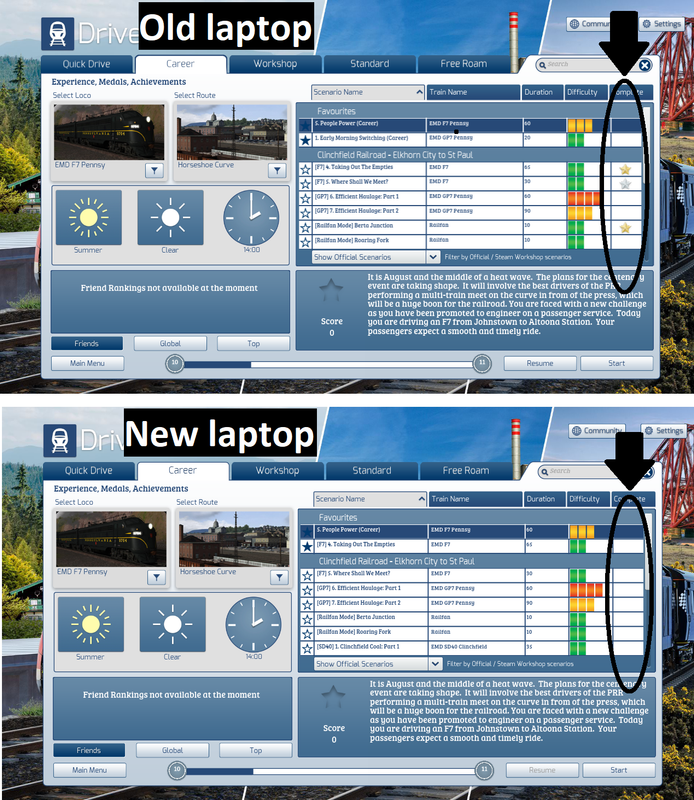
Seems Experience Level and Points did synchronise, but that was the case all the time (forgot to mention that before, sorry). Tick Marks and Medals still not Synchronized.
Will make some screenshots of old and new install to show differences in Ticked Marks and Medals tonight.
Re: Migrate settings to new laptop
Posted:
Wed Jan 13, 2021 7:22 amby mindenjohn
Completion of scenarios, in my experience, are not transferred when reloading on a new computer or an existing one. I just do the scenarios again, if I want to or not as the case may be. Medals - I have no experience and (sorry) no interest.
Re: Migrate settings to new laptop
Posted:
Wed Jan 13, 2021 10:03 amby Cardinal51
That is bad news John.
Hopefully the Scenario Completion (medals or Tick Marks is all I want) can be recovered some how.
Below an image illustrating the issue.
Re: Migrate settings to new laptop
Posted:
Wed Jan 13, 2021 11:02 amby mindenjohn
Remembering more as we go along, when I have repeated the career scenarios I have received the star (of appropriate colour) but no extra points, which bothers me none but I know irritates others.
Re: Migrate settings to new laptop
Posted:
Thu Jan 14, 2021 1:51 amby Chacal
For the tick marks, I can help.
From your old laptop, make a backup of Railworks\Content\SDBCache.bin.
Copy this file somewhere on your new laptop.
Then follow my tutorial here:
How to restore missing green tick marks in the scenario list.
I'm not sure what the other files in the Content folder do, but I wouldn't be surprised if they contained your medals and stars and whatnot.